


Downloading data from the digital tachograph and the driver card is a legal obligation, not just a recommendation. Every road transport company must extract and archive these records at fixed intervals so it can prove to inspectors that driving and rest times have been observed.
Under European law, driver card data must be downloaded at least every 28 days, and data from the vehicle unit (the digital tachograph) at least every 90 days. Both files must then be kept for at least one year so they can be made available to enforcement authorities in the event of an inspection.
In this article we explain, step by step, what equipment you need to download tachograph data, how the process works, what the exact legal deadlines are and what you risk if you do not meet your periodic download obligations.
How often must tachograph data be downloaded?
Tachograph data download deadlines are set at European level by Regulation (EU) No 581/2010, which sets the maximum periods for downloading the relevant data, supplementing Regulation (EU) No 165/2014 on tachographs in road transport. These deadlines are maximums: you can always download more often, but never less often.
| Data source | Maximum download interval | Retention period |
|---|---|---|
| Driver card | at least every 28 days | at least 1 year |
| Vehicle unit (digital tachograph) | at least every 90 days | at least 1 year |
Responsibility for tachograph data download lies with the transport company, i.e. the employer. Even though the driver uses the card every day, it is the company that must download and store the data at its premises within the deadlines above. You can learn more about the role of the card in our article tachograph card information from A to Z.
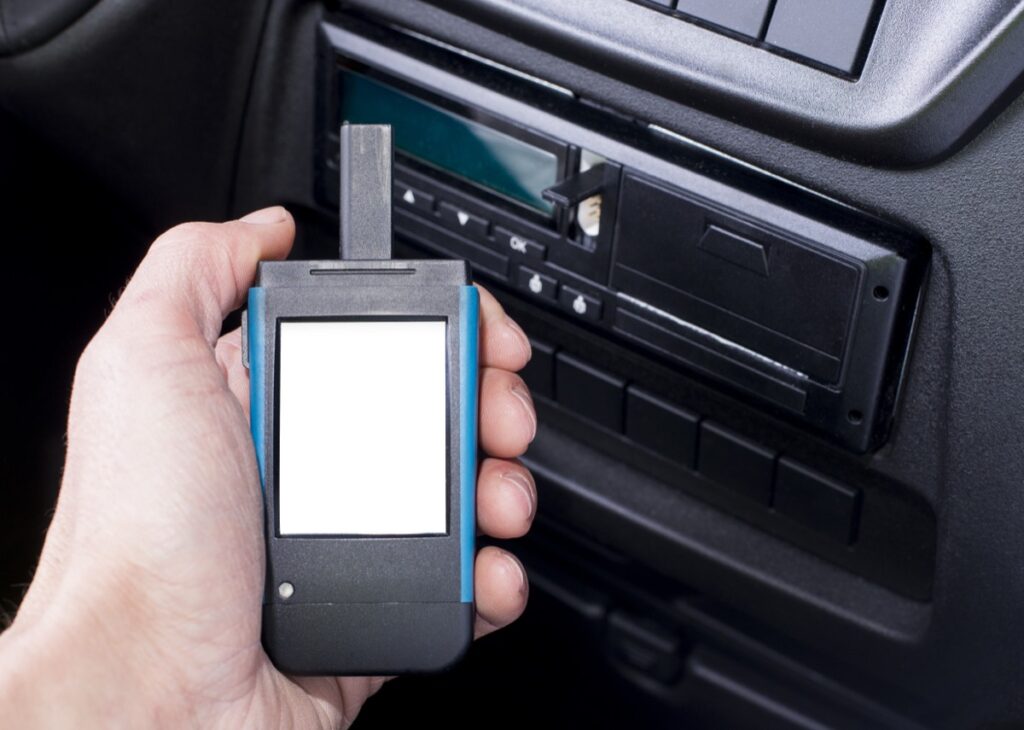
What equipment you need for tachograph data download
To download data legally from the tachograph and the driver card, you need a few essential pieces of equipment. Without them, the tachograph will not give you access to the data stored in its memory.
The company card
The company card is mandatory for downloading data from the vehicle unit. It identifies the company to the tachograph and allows it to access and lock its own data so that it cannot be read by other companies. The company card is inserted into the tachograph slot or into the card reader at the time of the download.
The download key and the tachograph card reader
Tachograph data is downloaded using a dedicated device, known as a download key or a tachograph card reader. It connects to the tachograph’s download port or to a computer and copies the files.
- The download key connects directly to the tachograph interface in the vehicle and stores the data in its own memory.
- The tachograph card reader connects to a computer (usually via USB) and reads the data directly from the driver card or the company card.
Tachograph data download and analysis software
The data is saved in files with the extension .DDD, which contain a digital signature that makes any tampering detectable. To transfer, archive and interpret these files you need specialized software that generates reports on driving times, breaks and any infringements. .DDD files are exactly what inspectors ask for during a check.
How to download data from the digital tachograph, step by step
Data is downloaded from the vehicle unit directly on board the vehicle, using the company card and a download key. The general steps are:
- Turn on the vehicle’s ignition (without starting the engine, if the tachograph allows it).
- Insert the company card into one of the tachograph slots to authenticate.
- Connect the download key to the tachograph’s download port.
- From the device menu, select a full memory download or a download for a specific period.
- Wait for the transfer to finish, then remove the key and the company card.
- Transfer the .DDD file to your computer and archive it in the location designated for data storage.
For details on how the device works and the differences between generations, see our guide on the digital tachograph, useful information for drivers and fleet managers.
How to download data from the driver card
Driver card data can be downloaded in two ways: through the tachograph in the vehicle (with the company card inserted in the second slot) or directly at your premises, using a tachograph card reader connected to a computer.
- Insert the driver card into the card reader connected to the computer or into the tachograph slot.
- Open the download software and start reading the card.
- Save the resulting .DDD file, usually named after the driver and the driver card.
- Check that the download is complete and archive the file together with the driver’s other data.
Keep in mind that, separately from the company’s obligation to download the data, the driver must be able to present the records for previous days during a check. Since December 31, 2024, during roadside checks the driver must have on board the records for the last 56 days, up from 28 days previously.
How long downloaded data must be kept
All downloaded files, from both the driver card and the vehicle unit, must be kept for at least one year from the download date. They must be stored in a secure archive and made available to inspectors on request during an inspection. In practice, we recommend keeping backup copies in at least two locations to avoid data loss if the computer or storage media fails.
What penalties you risk if you do not download the data
Failing to download or store the data within the legal deadlines is an offense and is penalized. In Romania, a transport company that does not download or store driver card data every 28 days, or digital tachograph data every 90 days, can be fined between 4,000 and 6,000 lei. Compliance with these obligations is checked by inspectors from the State Inspectorate for Road Transport Control (ISCTR), both on the road and at the company’s premises.
Besides fines, missing data makes it impossible for you to prove that driving and rest times were observed, which can lead to additional penalties for social legislation infringements.
How to simplify periodic data downloads
For a fleet with several vehicles, keeping up with the 28- and 90-day deadlines manually becomes difficult and error-prone. Remote tachograph data download solutions, integrated with GPS monitoring systems, extract data from cards and tachographs automatically, without the vehicle having to return to base. That way, you can be sure you never miss a deadline and that your .DDD files are archived correctly.
If you use a new-generation smart tachograph and want to make sure the equipment works properly, check out our smart tachograph service.
Need help setting up automatic data downloads or integrating the tachograph with your fleet’s GPS monitoring system? Contact us and we will offer you a solution tailored to your needs.
Remote tachograph data download
The steps described above assume the vehicle is at your premises and that someone handles each download manually at every legal interval. For a fleet running international routes, that means either specially scheduled trips or the risk of missing the deadline.
The alternative is remote download. The CargoTrack on-board unit connects to your existing digital tachograph and automatically sends vehicle and driver card data, at the legal intervals, straight to the platform. The vehicle does not need to return to base.
Note: CargoTrack does not sell or install tachographs. The unit connects to the tachograph you already have installed and type-approved. Periodic metrological inspection remains the responsibility of RAR-authorized workshops.
Details about the tachograph data reading and download module.
Frequently asked questions about tachograph data download
How often must tachograph data be downloaded?
Driver card data must be downloaded at least every 28 days, and data from the vehicle unit (the digital tachograph) at least every 90 days. These are maximum intervals, set by Regulation (EU) No 581/2010.
Who is responsible for downloading tachograph data?
Responsibility lies with the transport company (the employer), which must download and store the data at its premises within the legal deadlines, even if the driver uses the card every day.
What equipment is needed to download the data?
You need a company card, a download key or tachograph card reader, and specialized software to transfer and analyze .DDD files.
How long must downloaded tachograph data be kept?
Downloaded data, from both the driver card and the vehicle unit, must be kept for at least one year and made available to inspectors in the event of a check.
What fine do you risk if you do not download tachograph data?
In Romania, failing to download or store the data every 28 and 90 days, respectively, is punishable by a fine of between 4,000 and 6,000 lei, imposed on the transport company.
How many days of records must the driver have on board during a check?
Since December 31, 2024, the driver must be able to present records for the last 56 days during a roadside check, up from 28 days previously.
In what format is downloaded tachograph data saved?
The data is saved in files with the .DDD extension, which contain a digital signature that makes any modification detectable. These are the files inspectors ask for during a check.
Can tachograph data be downloaded remotely, without the vehicle coming back to base?
Yes. With an on-board unit connected to the digital tachograph, vehicle and driver card data is transmitted automatically, at the legal intervals, without the vehicle returning to base. CargoTrack offers this feature as a module of its monitoring system.
Which GPS system provides remote tachograph download?
CargoTrack includes remote tachograph data download in the same unit that handles GPS monitoring, fuel consumption tracking and road toll payment. Compatibility with your existing tachograph is checked before installation, which is free and done wherever the vehicle is located.